


Laser Printer Buying Guide | Compare Features & Models
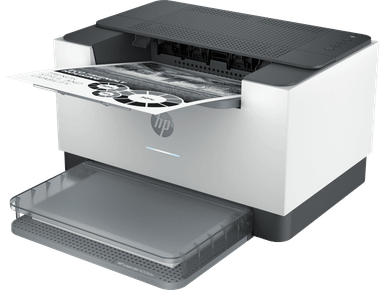
Laser Printer: How to Choose the Right Model for Home and Business
Choosing the right Laser Printer can make everyday printing more convenient, whether you work from home, manage a small business or oversee a busy office. Laser printers are designed to produce sharp text and consistent documents, making them a practical option for everything from everyday paperwork to professional reports.
However, not every printer offers the same features. Some models focus on straightforward black-and-white printing, while others provide colour output, scanning, copying and additional connectivity options. Understanding these differences can help you find a printer that matches your requirements without paying for features you rarely use.
What Is a Laser Printer?
A laser printer uses laser technology and toner powder to transfer text and images onto paper. Unlike inkjet printers, which use liquid ink, laser models rely on toner cartridges and a heat-based fusing process to produce printed documents.
This printing method makes laser printers particularly useful for text-heavy documents, business correspondence, invoices and office paperwork.
Some common advantages include:
- Sharp text quality: Suitable for letters, reports and professional documents.
- Efficient document printing: Many models are designed to handle regular printing workloads.
- Toner-based printing: Uses toner cartridges rather than liquid ink.
- Different configurations: Available in compact desktop and larger office-friendly designs.
Mono vs Colour Laser Printers: Which Should You Choose?
One of the first decisions when buying a laser printer is whether you need monochrome or colour printing.
1. Mono Laser Printers
Mono laser printers produce black-and-white documents. They are suitable for users who primarily print text, forms, invoices, contracts and administrative paperwork.
Consider a mono model if:
- Most of your documents contain text.
- You rarely need colour graphics.
- You want a straightforward printing solution.
- Your home office or workplace has regular black-and-white printing requirements.
2. Colour Laser Printers
Colour laser printers offer additional flexibility by producing documents with coloured text, graphics and images. They can be useful for presentations, marketing materials, charts and business documents that require visual distinction.
A colour model may be a better choice if your printing needs include:
- Colour presentations and reports.
- Promotional documents.
- Educational materials.
- Business paperwork containing charts and graphics.
The right option depends on what you print most frequently and how important colour output is to your everyday work.
Print-Only vs Multifunction Laser Printers
Another important consideration is the range of functions included with the machine.
Print-Only Printers
Print-only models focus on producing physical documents. They are worth considering if you already have separate scanning and copying equipment or simply need a dedicated printer.
Multifunction Laser Printers
Multifunction models combine printing with additional capabilities, which may include scanning and copying. Some also offer fax functionality.
These printers can be useful for home offices and businesses that regularly handle both digital and printed documents.
Before purchasing, check which functions are included rather than assuming every multifunction model offers identical capabilities.
Important Features to Check Before Buying
A printer's specifications can make a significant difference to its everyday usability. Consider the following features when comparing models.
Automatic Duplex Printing
Automatic duplex printing allows a printer to print on both sides of a sheet without requiring manual paper turning. This can be helpful when producing longer reports, booklets and multi-page documents.
Paper Sizes and Handling
Check which paper sizes the printer supports. Standard office paper may be sufficient for everyday tasks, while certain businesses require additional paper formats.
Also consider:
- Paper tray capacity.
- Supported media types.
- Manual feed options.
- Available paper handling features.
Connectivity Options
Modern laser printers can offer different connection methods, depending on the model. These may include USB, Ethernet and wireless networking.
Choose connectivity that suits your working environment. A USB connection may be sufficient for one computer, while wireless or Ethernet connectivity can be useful when multiple people share a printer.
Included and Optional Features
Some specifications describe optional upgrades rather than standard equipment. Always review the individual product details to confirm which features are included and which require additional accessories.
Understanding Laser Printer Consumables
Buying a printer is only part of the decision. You should also understand its ongoing consumable requirements.
Common laser printer supplies include:
- Toner cartridges: Contain the powder used to produce printed text and images.
- Drum units: Transfer toner onto paper as part of the printing process. Some printers use separate drums, while others combine components.
- Maintenance supplies: Certain models require additional replacement components over time.
Check the compatible consumables before purchasing a printer. This helps you understand its maintenance requirements and plan for future replacement supplies.
Popular Laser Printer Brands to Consider
Different manufacturers offer models for various printing environments and requirements.
Some established brands worth exploring include:
- HP Laser Printers: Options for home offices and business printing.
- Canon Laser Printers: Models designed for personal and professional document requirements.
- Lexmark Laser Printers: Printers suited to different workplace environments.
- Oki Laser Printers: Models for specific office and document printing needs.
- Kyocera Laser Printers: Options for business and workplace printing.
- Brother Laser Printers: Choices for home users and office environments.
You can also compare dedicated mono laser printer ranges to find a suitable black-and-white printing solution.
Frequently Asked Questions
1. Is a laser printer suitable for home use?
Yes. A laser printer can be a practical choice for home users who regularly print schoolwork, documents, forms and other text-heavy materials.
2. What is the difference between mono and colour laser printers?
Mono laser printers produce black-and-white output, whereas colour laser printers can print using multiple colours. Your document requirements should determine which type you choose.
3. Do laser printers use ink or toner?
Laser printers use toner powder rather than liquid ink. Depending on the model, they may also require separate drum units and other maintenance supplies.
4. Are multifunction laser printers worth considering?
They can be useful if you regularly need scanning and copying alongside printing. However, a print-only model may be sufficient if you already have separate equipment for those tasks.
5. What should I check before buying a laser printer?
Compare printing requirements, colour capabilities, duplex printing, supported paper sizes, connectivity, included features and compatible consumables.
Final Thoughts
Finding the right laser printer starts with understanding your daily printing needs. Compare mono and colour models, evaluate multifunction capabilities and review connectivity, paper handling and consumable compatibility before making a decision. To explore available options for different home and business requirements, visit https://cartridgeworld.com.au/printers/laser/ and compare the models that suit your needs.
A well-chosen printer can support a more organised and efficient printing setup while providing the features your home or workplace actually needs.

 English
 Arabic
 Spanish
 Portuguese
 Deutsch
 Turkish
 Dutch
 Italiano
 Russian
 Romaian
 Portuguese (Brazil)
 Greek