


Laser Printer Buying Guide: Find the Right Model for Home & Business
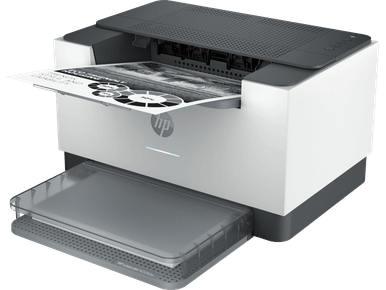
Laser Printer Buying Guide: Choosing the Right Printer for Home and Business
Choosing the right printer can make everyday printing more convenient, efficient and manageable. Whether you need a reliable machine for home documents, school assignments or a busy office, a Laser Printer is worth considering. These printers use toner and a laser-based printing process to produce text and graphics on paper.
However, not every model offers the same capabilities. Some are designed exclusively for black-and-white documents, while others support colour printing, scanning, copying and additional functions. Understanding these differences can help you select a printer that matches your requirements and working environment.
What Is a Laser Printer?
A laser printer uses an electrostatic printing process and powdered toner to transfer text and images onto paper. Unlike inkjet printers, which use liquid ink, laser models rely on toner cartridges and other imaging components.
They are commonly used in homes, workplaces and commercial environments where document printing is an important daily task.
Some key features include:
- Sharp text output: Suitable for letters, reports, invoices and professional documents.
- Toner-based printing: Uses toner cartridges rather than liquid ink.
- Different configurations: Available in monochrome, colour, print-only and multifunction options.
- Flexible connectivity: Depending on the model, connections may include USB, Ethernet and wireless networking.
Mono vs Colour Laser Printers: Which Should You Choose?
One of the first decisions when buying a laser printer is choosing between monochrome and colour printing.
1. Mono Laser Printers
A monochrome laser printer produces black-and-white output. It is a practical option for people who primarily print text-based documents and do not require coloured graphics.
Consider a mono model for:
- Office correspondence and business reports.
- Invoices, forms and receipts.
- Educational materials and study notes.
- Everyday administrative printing.
These printers are generally simpler in terms of colour-related consumables, making them worth considering when colour output is unnecessary.
2. Colour Laser Printers
Colour laser printers are designed for documents that require more than black-and-white output. They can be useful for presentations, charts, marketing materials and other colour documents.
Depending on the model, they may use separate toner cartridges for different colours.
A colour laser printer is worth considering if your regular printing involves:
- Business presentations and reports.
- Colour-coded charts and diagrams.
- Promotional documents.
- Educational resources with coloured graphics.
Before purchasing, consider how frequently you genuinely need colour printing.
Print-Only vs Multifunction Laser Printers
Another important consideration is whether you need basic printing or additional document-handling capabilities.
Print-Only Models
Print-only laser printers focus on producing printed documents. They are suitable for users who already have separate scanning and copying equipment or simply need a straightforward printing solution.
Their simpler functionality can make them a convenient choice for dedicated printing tasks.
Multifunction Models
Multifunction laser printers combine printing with other capabilities, commonly scanning and copying. Some models also include fax functionality.
They can be particularly useful in workplaces where employees regularly handle physical documents.
Before choosing one, check which functions are included rather than assuming every multifunction model offers identical features.
Important Features to Check Before Buying
The specifications can make a significant difference to how conveniently a printer fits into your daily routine.
Automatic Duplex Printing
Automatic duplex printing allows compatible printers to print on both sides of a sheet without manually turning the paper. This can help reduce paper consumption when producing longer documents.
Check whether duplex printing is automatic or requires manual intervention.
Paper Sizes and Handling
Consider the paper formats you regularly use. Standard office documents may only require common paper sizes, while certain professional tasks need additional formats.
Review supported paper sizes, input tray capacity and available paper-handling options.
Connectivity Options
Different printers support different connection methods. Depending on your setup, useful options may include:
- USB for direct computer connections.
- Wi-Fi for wireless printing.
- Ethernet for network-based office environments.
- Mobile printing support on compatible models.
Choose connectivity that works with your existing devices and network.
Included and Optional Features
Some features may be included as standard, while others require additional accessories or upgrades.
Always review the individual product specifications to understand exactly what comes with the printer.
Understanding Toner, Drum and Maintenance Supplies
A printer's purchase price is only one part of its overall ownership cost. It is also important to understand which consumables and replacement components the machine requires.
Toner cartridges: These contain the powder used to create printed images and text. Check cartridge compatibility and available replacement options.
Drum units: Some laser printers use a separate drum unit to transfer toner onto paper. Others incorporate imaging components into a combined cartridge.
Maintenance supplies: Depending on the model, replacement maintenance components may be needed over time.
Before buying, check the compatible toner cartridges, drum units and maintenance supplies. This helps you understand the printer's ongoing requirements and plan future purchases.
Popular Laser Printer Brands to Explore
Different manufacturers offer models for different printing environments and requirements.
Some established brands worth comparing include:
- HP Laser Printers: Options for home users and professional environments.
- Canon Laser Printers: Models covering everyday document printing and multifunction needs.
- Brother Laser Printers: A range of monochrome and colour printing solutions.
- Lexmark Laser Printers: Options designed for business document workflows.
- OKI Laser Printers: Models for various professional printing applications.
- Kyocera Laser Printers: Printers with different configurations for workplace requirements.
Comparing individual models is more useful than choosing based on brand name alone.
Frequently Asked Questions
1. Is a laser printer suitable for home use?
Yes. A laser printer can be suitable for home offices, students and households that regularly print documents, assignments and other materials.
2. What is the difference between mono and colour laser printers?
Mono printers produce black-and-white documents, while colour models can print using multiple toner colours. Your choice depends on the type of documents you regularly produce.
3. Do all laser printers support automatic duplex printing?
No. Automatic double-sided printing is model-dependent. Always check the specifications before purchasing.
4. Does a laser printer require both toner and a drum?
Not always. Some printers use separate toner cartridges and drum units, while others combine imaging components. Check the consumables listed for the specific model.
5. Are multifunction laser printers worth considering?
They can be useful if you regularly need printing, scanning and copying. However, a print-only model may be sufficient if you only require basic printing.
Final Thoughts
Finding the right laser printer involves more than comparing prices or selecting a familiar brand. Consider your printing volume, colour requirements, preferred functions, connectivity and replacement consumables before making a decision. To compare available options and explore models for different requirements, visit https://cartridgeworld.com.au/printers/laser/ and review the specifications of individual printers. A well-informed choice can make everyday printing simpler and better suited to your home or business.

 Arabic
 French
 Spanish
 Portuguese
 Deutsch
 Turkish
 Dutch
 Italiano
 Russian
 Romaian
 Portuguese (Brazil)
 Greek