


Cisco 500 Series Stackable Managed Switches | Complete Guide
Introduction
Reliable network connectivity is essential for businesses that depend on communication, data sharing and connected devices. As organisations expand, they need networking equipment that can support additional users, manage traffic efficiently and maintain stable performance.
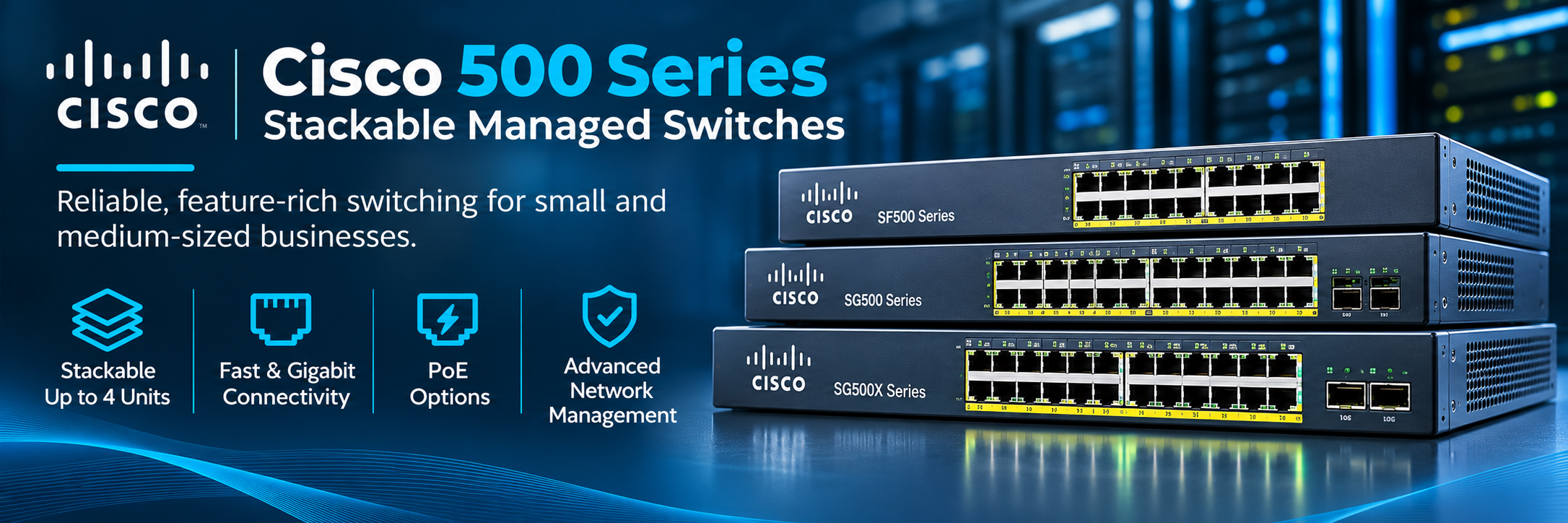
Cisco 500 Series Stackable Managed Switches provide advanced network management, flexible connectivity and stacking capabilities for small and medium-sized businesses. These switches connect computers, servers, wireless access points and other network devices while allowing administrators to control network traffic.
The Cisco 500 Series includes Fast Ethernet, Gigabit Ethernet and selected 10 Gigabit Ethernet models, providing different connectivity options for business networks.
Understanding the features, specifications and compatibility of these switches helps organisations make informed purchasing decisions, particularly when upgrading or maintaining existing network infrastructure.
What Are Cisco 500 Series Stackable Managed Switches?
Cisco 500 Series Stackable Managed Switches are business networking devices designed to connect multiple Ethernet devices and support centralised network administration.
Unlike unmanaged switches, these devices provide configuration options for managing network traffic, security policies and performance.
Stackable switching allows compatible devices to operate together as one logical switch, simplifying administration while increasing available network ports.
The Cisco 500 Series supports stacking configurations of up to four compatible units, subject to model and stacking-mode requirements.
This makes the series useful for organisations requiring expandable networking infrastructure without managing every switch separately.
Key Features of Cisco 500 Series Switches
Cisco 500 Series switches provide networking features designed to support business connectivity and operational requirements.
Stackable Network Architecture
Stacking is one of the main features of this product family.
Compatible Cisco 500 Series switches can be connected through supported stacking interfaces to form a single logical system.
Administrators can manage the stack through a common configuration environment rather than configuring each device independently.
A stack can include up to four supported switches, although compatibility rules vary between product families and operating modes.
This arrangement can simplify administration and support network expansion.
Advanced Network Management
Cisco 500 Series switches include management capabilities for configuring and monitoring network operations.
Depending on the model and software version, administrators can manage VLANs, access controls, traffic priorities and interface settings.
These features provide greater control than basic unmanaged networking equipment.
Power over Ethernet Support
Selected Cisco 500 Series switches support Power over Ethernet, allowing compatible devices to receive power through Ethernet cabling.
PoE-capable models can support equipment such as IP phones, wireless access points and security cameras.
Actual power availability depends on the specific model, supported PoE standard and total power budget.
Cisco 500 Series Switch Models
The Cisco 500 Series includes several product families designed for different network speeds and connectivity requirements.
Cisco SF500 Series Switches
Cisco SF500 switches primarily provide Fast Ethernet access ports operating at 10/100 Mbps.
Models such as the SF500-24 and SF500-48 offer different port configurations for business networking environments.
PoE-capable variants include the SF500-24P and SF500-48P, while selected Max PoE models provide additional power capabilities.
These switches may be suitable for maintaining compatible older networks where Fast Ethernet connectivity remains sufficient.
However, businesses deploying modern high-bandwidth applications should evaluate whether Gigabit Ethernet or faster alternatives are more appropriate.
Cisco SG500 Series Switches
The Cisco SG500 Series provides Gigabit Ethernet connectivity for business networks requiring higher access-port speeds.
Popular models include the SG500-28, SG500-28P and SG500-52.
Different configurations offer varying numbers of ports and optional PoE capabilities.
Gigabit connectivity is useful for computers, network printers, servers and other business devices requiring faster data transmission than Fast Ethernet.
These switches can support managed network segmentation and business connectivity requirements.
Cisco SG500X Series Switches
Cisco SG500X switches provide Gigabit Ethernet access connectivity with higher-speed network connection options.
Models such as the SG500X-48P and SG500X-48MP support larger business networks requiring multiple connected devices.
Selected SG500X configurations include 10 Gigabit Ethernet interfaces for uplink or stacking-related connectivity, depending on the operating mode.
Businesses should confirm interface availability and stacking requirements before selecting a specific model.
Cisco SG500XG Series Switches
Cisco SG500XG models focus on higher-speed networking requirements.
For example, the SG500XG-8F8T provides sixteen 10 Gigabit Ethernet ports, combining fibre-oriented and copper connectivity options.
These switches can be useful for connecting compatible servers, storage equipment and high-bandwidth network infrastructure.
The exact cabling and transceiver requirements depend on the selected interfaces.
Benefits of Stackable Managed Switches
Stackable switches offer several advantages for organisations managing multiple connected devices.
Simplified Network Administration
A compatible switch stack operates as one logical management system.
This allows administrators to monitor and configure supported devices through a shared management environment.
Centralised administration can reduce repetitive configuration work and simplify routine maintenance.
Flexible Network Expansion
As businesses add employees and connected equipment, additional Ethernet ports may become necessary.
Stacking compatible switches allows organisations to increase the number of available ports while maintaining a coordinated network structure.
However, expansion remains subject to the maximum supported stack size and model compatibility.
Improved Management Resilience
Cisco 500 Series stacking supports master and backup roles in appropriate configurations.
If the active stack master fails, a configured backup can assume the management role.
This can improve management availability, although stacking does not guarantee uninterrupted connectivity during every hardware or network failure.
Cisco 500 Series Network Security Features
Business networks require security controls to protect connected systems and manage access.
VLAN Support
Virtual Local Area Networks allow administrators to divide a physical network into separate logical segments.
For example, employee devices and guest networks can be placed in different VLANs.
This supports network organisation and helps limit unnecessary communication between designated groups.
Access Control Lists
Supported Cisco 500 Series models provide access control capabilities for regulating selected network traffic.
Administrators can configure appropriate rules to permit or restrict communication according to network requirements.
Port Security and Authentication
Depending on the switch configuration, security features can help control which devices connect to the network.
These capabilities support access management but should operate alongside broader cybersecurity measures.
Layer 2 and Layer 3 Capabilities
Cisco 500 Series switches provide different network functions depending on model and operating mode.
Layer 2 Switching
Layer 2 switching forwards Ethernet frames within local networks using MAC address information.
It supports communication between connected devices and allows administrators to configure VLANs and other switching functions.
Layer 3 Routing
Selected Cisco 500 Series models provide Layer 3 functionality for routing traffic between IP networks.
Supported routing features differ between models and software versions.
Businesses requiring advanced routing should verify the exact capabilities of their selected switch rather than assuming every Cisco 500 Series model offers identical functionality.
Cisco 500 Series Switches for Business Applications
Different commercial environments require different networking capabilities.
Small Business Offices
Small offices use network switches to connect desktop computers, printers, IP phones and wireless access points.
Cisco 500 Series switches can support organised device connectivity and provide management features for separating network traffic.
Retail and Commercial Properties
Retail environments depend on networking equipment for point-of-sale systems, computers, wireless connectivity and other business devices.
Managed switching allows administrators to configure appropriate network segments for different applications.
Warehouses and Industrial Facilities
Warehouses use connected devices for inventory systems, communications and operational applications.
Suitable Gigabit and PoE-capable switches can support devices throughout designated network areas.
Existing Enterprise Networks
Cisco 500 Series hardware may also be useful when organisations need compatible replacements for existing installations.
Matching the correct model can reduce compatibility problems and unnecessary changes to network configurations.
Cisco 500 Series vs Cisco Catalyst Switches
Cisco 500 Series switches were designed primarily for small and medium-sized business environments.
Cisco Catalyst switches serve a broader range of enterprise access, campus and distribution networking requirements.
Modern Catalyst platforms may offer newer interface standards, software capabilities and management options.
However, replacing existing equipment is not always necessary when a supported configuration still meets business requirements.
Organisations should compare performance, security support, compatibility and long-term operating costs before making a decision.
How to Choose the Right Cisco 500 Series Switch
Selecting the correct model requires understanding the network's actual requirements.
Check Port Count and Speed
Businesses should identify the number of devices requiring wired connections and their necessary speeds.
Fast Ethernet models may suit certain legacy applications, while Gigabit and 10 Gigabit models support higher-bandwidth requirements.
Evaluate PoE Requirements
Organisations connecting IP phones, wireless access points or security cameras should consider suitable PoE models.
The total power budget must be sufficient for the connected devices.
Verify Stacking Compatibility
Not every Cisco 500 Series model can be combined freely within the same stack.
Stacking compatibility depends on product family, supported operating mode and software configuration.
Administrators should confirm these requirements before purchasing additional equipment.
Cisco 500 Series Stackable Managed Switches Price
Cisco 500 Series switch prices vary according to model, port count, Ethernet speed, PoE capabilities, hardware condition and availability.
Basic Fast Ethernet models generally have different acquisition costs from high-performance 10 Gigabit Ethernet configurations.
PoE-enabled switches may also cost more because of their additional power delivery capabilities.
Businesses should consider shipping, warranty coverage, accessories and replacement requirements when comparing prices.
New vs Refurbished Cisco 500 Series Switches
Some organisations purchase refurbished Cisco 500 Series switches to maintain existing networks at a lower initial cost.
However, these are legacy product families, and buyers should carefully verify manufacturer support, security update availability and software requirements.
The exact product lifecycle status should be checked for each model.
Refurbished equipment should also be evaluated for physical condition, functionality, warranty coverage and included accessories.
Maintaining Cisco 500 Series Switches
Regular maintenance helps organisations keep existing switch infrastructure operational.
Administrators should monitor interface errors, connected devices, temperature and network utilisation.
Configuration backups are important when replacing equipment or recovering from operational problems.
Software maintenance should follow the available manufacturer guidance for the installed model.
Proper ventilation, cabling and power arrangements also contribute to reliable operation.
Conclusion
Cisco 500 Series Stackable Managed Switches provide flexible connectivity, network management and stacking functionality for small and medium-sized business environments.
The SF500, SG500, SG500X and SG500XG families support different Ethernet speeds and deployment requirements.
Their managed features can help organisations configure VLANs, control traffic and simplify administration.
When maintaining existing networks, businesses should prioritise hardware compatibility, supported stacking configurations and long-term security requirements.
Selecting the right model helps organisations maintain stable connectivity while making practical use of their networking investments.
Frequently Asked Questions (FAQs)
What are Cisco 500 Series Stackable Managed Switches?
Cisco 500 Series Stackable Managed Switches are business networking devices that connect Ethernet equipment and provide configurable features such as VLANs, traffic management and supported switch stacking.
How many Cisco 500 Series switches can be stacked together?
Supported Cisco 500 Series models can form stacks containing up to four units. Compatibility depends on the product family, stacking mode and software configuration.
What is the difference between Cisco SF500 and SG500 switches?
Cisco SF500 switches primarily provide Fast Ethernet access connectivity at 10/100 Mbps, while Cisco SG500 switches provide Gigabit Ethernet access connectivity.
What is the difference between Cisco SG500 and SG500X switches?
SG500 models primarily focus on Gigabit Ethernet business networking, while SG500X models provide additional high-speed connectivity options, including selected 10 Gigabit Ethernet interfaces.
Do Cisco 500 Series switches support PoE?
Yes. Selected models, including certain SF500 and SG500 variants, support Power over Ethernet. Available power depends on the exact model and configuration.
Can Cisco 500 Series switches perform Layer 3 routing?
Selected models support Layer 3 routing capabilities. The available routing features depend on the product, software version and operating mode.
Are Cisco 500 Series switches suitable for modern networks?
They may remain useful for compatible existing installations, but businesses planning new infrastructure should evaluate newer switches, supported security updates and long-term manufacturer support.
How much do Cisco 500 Series Stackable Managed Switches cost?
Prices depend on model, port configuration, connectivity speed, PoE support, equipment condition and availability. Refurbished units may provide lower acquisition costs, but support and compatibility should be verified before purchase.
Technical details checked against Cisco's 500 Series administration documentation and the relevant product category.

 English
 Arabic
 French
 Spanish
 Deutsch
 Turkish
 Dutch
 Italiano
 Russian
 Romaian
 Portuguese (Brazil)
 Greek