


Laser Printer Buying Guide: Features, Types & Brands to Explore
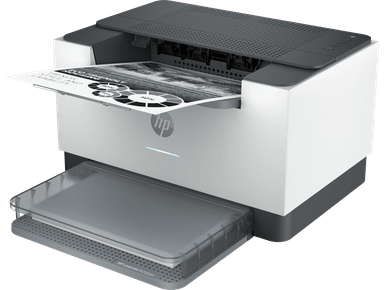
Laser Printer: A Practical Guide to Choosing the Right Printer for Home and Business
Choosing the right Laser Printer can make everyday printing more convenient, whether you work from home, manage a busy office or run a small business. Known for their use of toner rather than liquid ink, laser printers are worth considering for users who regularly print documents, reports, invoices and other business materials.
However, not every printer offers the same features. Some models focus on straightforward black-and-white printing, while others provide colour output, scanning, copying and additional connectivity options. Understanding these differences can help you find a machine that suits your workload and printing preferences.
This guide explores the main types of laser printers, the features worth comparing and the factors to consider before making a purchase.
What Is a Laser Printer?
A laser printer is a printing device that uses an electrostatic process and powdered toner to produce text and images on paper. Unlike inkjet printers, which use liquid ink, laser models use toner cartridges to create printed output.
They are commonly used in homes, educational environments and workplaces where consistent document printing is important.
Some key considerations include:
- Toner-based printing: Uses powdered toner instead of liquid ink.
- Document quality: Suitable for producing clear text and professional-looking documents.
- Different configurations: Available as print-only or multifunction machines.
- Consumables: May require toner cartridges, drum units and other maintenance supplies, depending on the model.
Types of Laser Printers to Consider
Understanding the available printer categories is a useful starting point.
1. Mono Laser Printers
Mono laser printers produce black-and-white output. They are a practical option for users who primarily print text-based materials.
Common applications include:
- Business correspondence and invoices.
- School and university assignments.
- Office reports and forms.
- Everyday household documents.
If colour printing is unnecessary, a mono laser printer can offer a straightforward solution without paying for colour-printing functionality.
2. Colour Laser Printers
Colour laser printers are designed for documents that require multiple colours. They can be useful for businesses, students and home users who regularly print presentations, charts, graphics and marketing materials.
When comparing colour models, consider the availability and cost of compatible toner cartridges and whether the printer supports the paper types you commonly use.
3. Multifunction Laser Printers
A multifunction laser printer combines printing with additional capabilities, which may include scanning and copying. Some models also offer fax functionality.
These machines can be useful when you want to handle several document-related tasks using one device.
Consider whether you genuinely need these additional functions before choosing a multifunction model over a print-only printer.
Important Features to Compare Before Buying
A printer's specifications can make a significant difference to its everyday usefulness. Look beyond the brand name and compare the features that match your requirements.
Automatic Duplex Printing
Automatic duplex printing allows a compatible printer to print on both sides of a sheet without requiring manual page flipping. This feature can help reduce paper consumption and simplify larger printing tasks.
Always check whether automatic duplex printing is included with the specific model.
Paper Sizes and Handling
Consider the paper sizes supported by the printer. While many models handle standard A4 paper, your requirements might include different sizes or paper types.
Check the paper tray capacity and supported media before purchasing.
Connectivity Options
Different laser printers offer different connection methods. Depending on the model, available options may include:
- USB connectivity for direct computer connections.
- Wi-Fi for wireless printing.
- Ethernet for network-based office environments.
- Mobile printing support for compatible devices.
Choose connectivity options that work with your existing computers, mobile devices and office network.
Print-Only or Multifunction Design
A print-only machine may be sufficient if your primary requirement is document printing. However, a multifunction model could be more convenient if scanning and copying are regular parts of your routine.
Exploring Popular Laser Printer Brands
Several established manufacturers offer laser printing solutions for different environments and requirements.
- HP Laser Printers: Options for home users and business environments.
- Canon Laser Printers: Models covering everyday document printing and office requirements.
- Lexmark Laser Printers: Choices worth exploring for business document workflows.
- Oki Laser Printers: Models to consider when comparing different printing technologies and configurations.
- Kyocera Laser Printers: Options for users evaluating office printing equipment.
- Brother Laser Printers: A range of mono, colour and multifunction printing solutions.
Comparing specifications across manufacturers can help identify a model with the right combination of features, connectivity and consumable requirements.
Understanding Toner, Drum and Maintenance Supplies
Before purchasing a laser printer, consider its ongoing consumable requirements.
Toner cartridges contain the powder used to produce printed documents. Some printers also use separate drum units, which transfer the toner image during the printing process.
Other models may incorporate different maintenance components.
Check the individual product specifications to understand:
- Which toner cartridges are compatible.
- Whether the drum is separate or integrated.
- Whether maintenance supplies are included.
- Which consumables need to be purchased separately.
- The availability of compatible replacement supplies.
Understanding these requirements beforehand can make it easier to plan for ongoing printer ownership.
Where to Find a Suitable Laser Printer
The right choice depends on your printing volume, preferred output, available space and essential features. Comparing mono and colour models, multifunction capabilities, automatic duplex printing and compatible consumables can help narrow down the options.
You can explore available models and compare different configurations at https://cartridgeworld.com.au/printers/laser/ to identify a laser printer that aligns with your home or business requirements.
Frequently Asked Questions
1. Is a laser printer suitable for home use?
Yes. A laser printer can be suitable for home use, particularly if you regularly print assignments, work documents, forms and other text-heavy materials.
2. What is the difference between mono and colour laser printers?
Mono laser printers produce black-and-white documents, whereas colour laser printers can produce documents containing multiple colours. Your printing requirements should determine which type you choose.
3. Are multifunction laser printers worth considering?
They can be useful if you regularly scan, copy and print documents. Combining these functions in one device may also help reduce the need for separate office equipment.
4. Do all laser printers support automatic duplex printing?
No. Automatic duplex printing is model-dependent. Always check the product specifications to confirm whether this feature is included.
5. Do laser printers require drum replacements?
Some laser printers use separate drum units that require replacement after a period of use. Others have different component arrangements. Check the manufacturer's specifications for the correct maintenance requirements.
Conclusion
A suitable laser printer should match your everyday printing needs without unnecessary features or complicated maintenance requirements. By comparing printer types, connectivity, paper handling and consumable compatibility, you can make a more informed decision for your home or workplace.

 English
 Arabic
 French
 Spanish
 Deutsch
 Turkish
 Dutch
 Italiano
 Russian
 Romaian
 Portuguese (Brazil)
 Greek